AIDA (Aid Information Data Analytics)
International Development · Data Visualisation
AIDA is where aid data gets published and understood. It closes the gap between the organisations that report where money goes and the people who need to follow it.
AIDA is live.

01 / The Problem
IATI enables transparency, but the usability of that open data remained an issue in the IATI ecosystem.
IATI has succeeded in making aid data publicly available. But being available is not the same as being usable. The data lives in structured XML that requires specialist querying skills to extract meaning from. NGOs face high friction producing compliant files. Policy analysts and field workers can't get answers without technical help.
The organisations most responsible for aid accountability were the least equipped to work with the raw data format designed to hold them accountable.
AIDA's challenge was to serve both sides simultaneously: lower the publishing barrier for those contributing data, and make that same data explorable and interpretable for those consuming it — without building two disconnected products.
02 / Product overview
Two products, one standard.
AIDA already served both sides of the IATI standard by v2. Power had come at the cost of usability, locking out the non-technical users it was built for. The v3 redesign kept what worked and closed that gap.


AIDA Explorer
The consumption side
Interactive dashboards over IATI data: funding totals, recipient geographies, organisations, sectors, and activity-level detail. Featured presets carry non-technical users into a meaningful first view before they touch a filter.
AIDA Publisher
The production side
A guided workflow that abstracts IATI XML into three steps. Gold Standard templates remove the blank page for first-time publishers, and full spec compliance stays intact underneath.
01
Connect your data
Upload CSV, XLSX or XML — single or batch. Connect Google Drive or OneDrive. Gold Standard templates remove the blank-canvas problem for first-time publishers.
02
Validate & visualise
Check for errors, review data previews and validity status. Clear error messages with fix suggestions. Pre-publication data visualisations build trust before submission.
03
Publish to IATI
Connect the IATI Registry once with your Publisher ID and API Token. Select files, submit, and track publishing status — Drafted → Published → Visualised.


03 / Users
Two personas. Two different jobs to be done.
Through participatory research and stakeholder sessions, I polished the existing two distinct user archetypes. Both with different data literacy, sector focus, and relationship to IATI. The main improvement I have done on archetypes was to add an interception window: when we should reach to the user to keep them on the platform, and use AIDA on their daily operations. Later, the design challenge became finding shared mental models that could support these archetypes without dumbing down the power interface for experts.

AIDA Publisher Persona.

AIDA Explorer Persona.
04 / Ecosystem Map
Where AIDA sits in the global aid data landscape
Understanding AIDA’s positioning required mapping the entire ecosystem it operates within. IATI is not just a data standard. It’s a network of publishers, registries, validators, and downstream consumers, each with their own tools, workflows, and pain points. AIDA doesn’t replace that infrastructure. It sits on top of it.
What made this mapping essential as a design exercise (not just a strategy one) was that it directly shaped product decisions. Knowing which nodes in the ecosystem were already well-served told us where not to build. Knowing where the gaps were, particularly around usability and onboarding, told us where AIDA could have the most impact.
AIDA occupies a unique position: it’s the only platform that serves both the publishing and consumption sides of the IATI standard. That’s not a coincidence. It came out of the research. Publishers and consumers were being treated as separate audiences by every existing tool, but in practice, many organisations do both. Designing for that overlap became a core principle.
AIDA Ecosystem Map.
The map also surfaced dependencies that affected the design directly. Publisher workflows depend on the IATI Registry’s API and validation rules, which means the interface has to absorb upstream changes gracefully. Explorer dashboards pull from data that varies wildly in quality and completeness across publishers, which means the visualisation layer has to handle missing data as a first-class design problem, not an edge case.
05 / Market Positioning
A clear gap in a fragmented landscape
No existing IATI tool combined accessible exploration with a guided publishing workflow. Aid-focused tools clustered bottom-left, they are powerful but technical. General BI tools sat mid-right, they are usable but requiring users to bring their own data and configuration. AIDA already aimed for the top-right; the redesign’s job was to finally deliver it to non-technical users. Hover any point for details.
AIDA Market Positioning.
06 / Key Design Decisions
Where the redesign earned its keep.
01 Publisher, raised to the level of exploration
v2
Publishing sat below exploration. It was a secondary, buried function.
v3
Publisher is surfaced as a peer to Explorer, sharing the top-level shell and design system. The dual-mode promise became visible in the structure.
Why
Many organisations both publish and consume aid data, yet every existing tool split them into separate audiences. Raising Publisher to exploration's level is what makes AIDA genuinely one product for both and lets publishers see their own data visualised the moment it goes live, reinforcing the motivation to keep publishing well.
02 An editorial layer over the data
v2
Charts shipped bare: a total and a shape, left for the reader to decode
v3
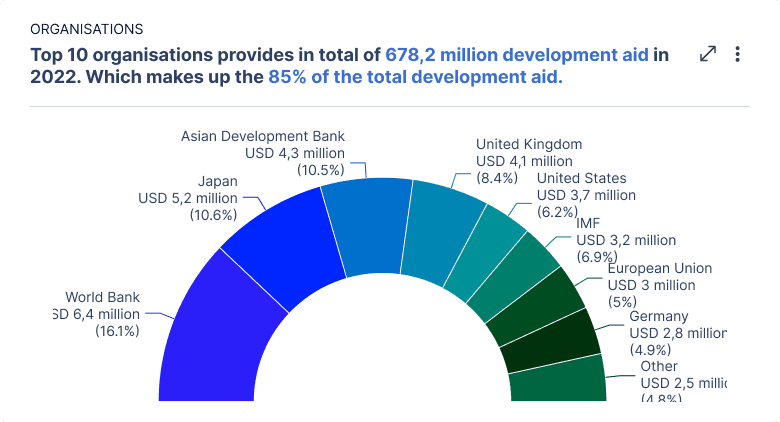
Every chart leads with a written finding. The title states what the data means; the chart backs it up. You can follow the story without reading a single axis.
Why
The audience includes policy and field staff with no data-analysis training. An editorial layer turns "here's a chart" into "here's what's happening".
03 Index-led navigation, not map-led
v2
A map-driven interface. You started at a world map and drilled in from there. Fine if you thought geographically, a dead end if you didn't.
v3
Dedicated Organisations, Sectors, and Locations pages, each an index you can scan and drill into. The map became one route in among many others.
Why
People arrive with a named org, sector, or country in mind as often as a region. Indexing by the dimensions people actually search restored those entry points; the map stayed for the geographic view.
04 Featured filters for guided discovery
v2
A fully open filter panel exposing dozens of dimensions at once.
v3
Curated presets that drop newcomers into a meaningful view in one click; power filters stay one tap away.
Why
User testing showed the open panel paralysed less-experienced users, they didn't know where to start. Presets propose a question instead of demanding one and sparks curiosity to dig deeper.
07 / Information Architecture
One coherent structure serving two product modes.
AIDA’s IA challenge was reworking the navigation so it didn’t fragment Explorer-only users, Publisher-only users, and the critical dual-mode users who genuinely need both. The solution: a shared top-level shell with clearly colour-coded product modes (green for publisher tool, blue for data exploration), role-aware entry points, and seamless switching without losing context.

AIDA Sitemap, full page structure.
Architectural principles
1
Mode-aware, not mode-locked
Explorer and Publisher share a single shell. Users can switch freely, essential for dual-mode users who publish their own data and explore others'.
2
Progressive disclosure
Featured filters guide newcomers. Advanced filters remain one tap away. The XML compliance layer surfaces only when needed.
3
Trust before commitment
No data leaves the platform without validation, preview, and confirmation. Inline error states and suggestions reduce the anxiety of publishing official government data.
08 / Outcomes
What shipped and what changed.
AIDA is live and in production at aida.tools, used across the international aid-data sector for IATI publishing and analysis. The brief was to serve both sides of the standard — the people contributing data and the people trying to read it. Both shipped.
AIDA Publisher went from a blank canvas to a guided flow.
The previous flow opened directly onto an upload form: file-type choices, output naming, URI generation, all before the user understood the path. The redesign leads with a plain-language Publish in 3 steps overview and a single primary action, turning an empty state into onboarding. In early moderated testing (small sample), time-to-publish fell from roughly 1:20 to about a minute. Directional, and consistent with the change.
AIDA Explorer was filter panel driven, now it tells an interpreted story.
The earlier Explorer was powerful but raw: a six-dimension filter bar as the entry point, charts presented without interpretation, and treemaps dense enough to be unreadable. The redesign leads each view with a sentence stating what the data means, replaces blank-canvas filtering with featured presets that open meaningful views in one click, and swaps the least legible charts for clearer ones. Powerful data, made readable for non-specialists.
A system that compounds.
The component library built for AIDA now scales across multiple Zimmerman aid-data portals. Three shared libraries are built: Logo pack, chart library and UI library. These libraries are used in every Zimmerman product.
09 / Reflections
What I’d carry into the next project.
01
Complexity doesn't need to be hidden, it needs to be timed.
Progressive disclosure worked not by removing hard decisions, but by sequencing them when users had enough context to make them confidently. The XML is still there; it just arrives later.
02
In civic tech, trust is a design element.
Users publishing official government data need to feel the system is robust before they'll commit. Validation feedback, pre-publish previews, and clear error states weren't nice-to-haves; they were load-bearing features for adoption.
03
A shared design system compounds your impact.
Building the component library to scale across AIDA and other Zimmerman portals meant design decisions improved platform-wide, not just locally. The investment pays back exponentially over time.
10 / Take a Look
AIDA is live.
11 / Keep Exploring